
 Image 1 of 11
 Image 2 of 11
 Image 3 of 11
 Image 4 of 11
 Image 5 of 11
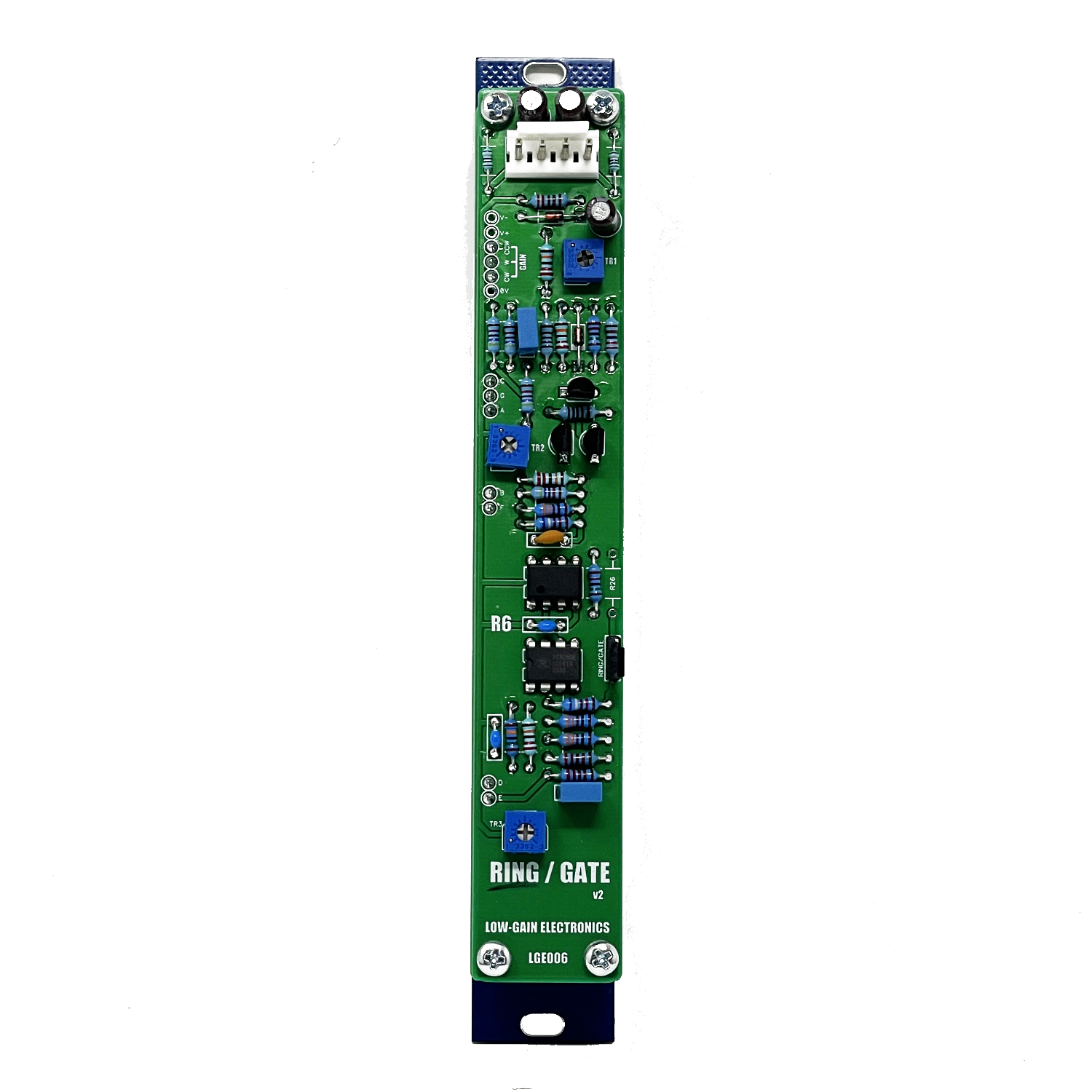 Image 6 of 11
 Image 7 of 11
 Image 8 of 11
 Image 9 of 11
 Image 10 of 11
 Image 11 of 11
LGE006 – Dual Ring Modulator / Gate (VCA) Module
The LGE006 is a dual-function module built on a single PCB that can be assembled as either a Ring Modulator or a Gate (VCA). This design originates from the classic paperface era, where it was often found with both Ring and Gate configurations built side-by-side.
From the Original Catalog:
"The RING MODULATOR/GATE (MOD) is an AC or DC coupled Ring Modulator and VCA featuring superior audio processing capabilities. The Ring Modulator offers two VC inputs in addition to the two signal inputs, which may be used to perform voltage-controlled transitions between full ring modulation and amplitude modulation. The VCA can be used as a standard voltage-controlled amplifier with either log or linear control voltage characteristics. The DC-coupled input is useful for using the VCA as a DC multiplier or gate."
Key Features:
Build Options: Choose between Ring Modulator or Gate (VCA) functionality
AC or DC Coupled Operation for audio or CV signal processing
Dual VC Inputs for dynamic control over modulation depth
Selectable Log or Linear CV Response (VCA mode)
DC-Coupled VCA Input enables use as a DC multiplier or precision gate
Inverted Linear CV Quirk:
A unique characteristic of this VCA is its inverted Linear CV input. This inversion opens the door to creative modulation tricks when using both CV inputs. However, use caution: if your Linear CV dips into negative voltage, the VCA can amplify the signal up to the full power rails, potentially resulting in extremely loud outputs. This could damage your ears or speakers.
Use the built-in CV attenuators to manage your levels carefully.
You've been warned! 🙂
A Bit of History:
The original PCB was labeled "R6":
"R" stands for Randy Cohen, the designer of the PCB in 1972
"6" designates this as the 6th module in a series of 16 that made up the early “People’s Synth”, also known as the Serge-O-Vox
– Arpad Benares (3/28/2025)
🔗 Read more about Randy Cohen here
For more information on the circuit, Ken Stone provided a great little write up about it here.
Using Ken Stones CGS79 PCB as an example for wiring the panel for the Ring option can be seen here.
DIY Information: (Some older documentation on the original R6)
Combined LGE006 V2 Main + I/O Board Bill of Materials
Main Board V2: (clean build, no cuts/mods required)
LGE006 Main Board Bill of Materials V2
LGE006 Main Board Schematic V2
LGE006 Main Board PCB w/ Designators V2
I/O Boards (LGE006GC = Gate config, LGE006RC = Ring config)
LGE006GC I/O Board PCB Bill of Materials
LGE006GC I/O Board Schematic / Wiring Diagram
LGE006GC I/O Board PCB w/ Designators
LGE006RC I/O Board PCB Bill of Materials
LGE006RC I/O Board Schematic / Wiring Diagram
LGE006RC I/O Board PCB w/ Designators
LGE006G Printable Panel Art
LGE006R Printable Panel Art
V1: (trace cutting required)
LGE006 Schematic
LGE006 PCB w/ Designators
LGE006 Bill of Materials
LGE006 PCB Mod Required for Gate/VCA function
LGE006C Panel Wiring Diagram / Schematic (Ring / Gate)
Mechanical Parts BOM generally required for building Low-Gain Electronics Modules
** 4U Modular is a term used for the format most commonly known as “Serge Format” or “Loudest Warning Format”. Out of respect for the ever growing format, 4U Modular is the easiest way to refer to it. More Specifically it refers to the panel height and mounting hole style. 4U Modular will patch up just fine with other 4U "Serge" formats such as "Random Source", but it will not mount in RS boats or Buchla Boats (or power off Buchla power for that matter). An info page about this will be added to the website soon to make this a lot more easy to understand.
Details:
PCB Size: 6” x 1”
Current Draw: TBD
Trim Instructions
Gate / VCA Trim Procedure
Input Calibration
Patch an audio source into the AC Input.
Set TR3 (R12 on schematic) to its center position.
Adjust TR2 (R9 on schematic) until the output amplitude matches the input (unity gain).
DC Offset Calibration
Patch a DC source into the DC Input.
Adjust TR1 (R5 on schematic) for minimum output offset.
Ring Modulator Trim Procedure
Initial Setup
Turn the panel potentiometer fully clockwise (to ground).
Set TR3 (R12) to the center position.
Set TR2 (R9) fully to the +V position.
Input Signal Setup
Input a 500 Hz, 0–5V sawtooth wave into both Input X and pad A (note: pad A has no panel connection).
Monitor the Output with an oscilloscope.
TR1 Adjustment
Adjust TR1 (R5) until the output waveform is symmetrical and rectified.
You should see a rounded-bottom rectified sawtooth waveform.
Feedthrough Minimization
Disconnect the sawtooth from Input X, but leave it connected to pad A.
Increase oscilloscope sensitivity.
Adjust TR3 (R12) for minimum feedthrough (least visible or audible sawtooth leakage).
It is recommended to re-adjust TR1 for symmetry after setting TR3.
Cross-Modulation Calibration
Reconnect the sawtooth to Input X, then also connect it to Input Y.
Adjust TR2 (R9) to achieve the most symmetrical output at 1000 Hz.
Expect some waveform distortion due to transistor non-linearity.
Alternative Method (Simplified)
Set the X–XY pot to X (fully clockwise).
Connect an audio-frequency triangle wave to Input X.
Adjust TR2 (R9) and TR3 (R12) alternately to minimize carrier bleedthrough.
Move the triangle wave to Input Y.
Connect a second triangle wave at ~1 Hz to Input X.
Adjust TR1 (R5) to achieve a balanced “throb” at the output.
Quick & Easy calibration for the R6 Ring shown in this video:
TR1 = Y “GAIN”/”SYMMETRY” TRIM
TR2 = Y OFFSET TRIM
TR3 = X OFFSET TRIM (OUTPUT OFFSET)